
Appearance
Track training runs
klars shows the training data your script reports: metrics, configuration, checkpoint references, and evaluation associations. It does not automatically capture your training steps.
Prepare the tracker
klars_track is not a pip package. It is a single Python file, klars_track.py, that uses only the standard library (Python 3.9–3.13). You import it straight from disk.
Get the file. In the klars source tree it lives at
tools/tracking/klars_track.py. The desktop app does not install it for you, so get a copy from whoever gave you klars.Make it importable. Put
klars_track.pyin the same folder as your training script, or add the folder that contains it toPYTHONPATH:shexport PYTHONPATH="/path/to/folder-with-klars_track:$PYTHONPATH"Keep klars running. The klars app (or
klars serve) must be running while your script trains.
How the tracker finds klars
If klars runs on the same computer, as the same user, with the default data directory, the tracker finds it automatically by reading the private record ~/.klars/app/server.json. You don't need to set any environment variables.
From a container, another machine, or a custom data directory, set the connection explicitly:
| Variable | Value |
|---|---|
KLARS_URL | The service address, for example http://127.0.0.1:4317 over an SSH tunnel |
KLARS_TOKEN | A tracking token from Settings › Experiments › Tracking tokens |
KLARS_PROJECT_ID | The project ID. Required with a tracking token, because a token cannot look up projects |
You can also pass url=, token= and project= to init().
Run your script from the project's Git checkout, or from a directory that has a .klars/ folder in it or above it. If neither exists, pass project="PROJECT_ID" to init() or set KLARS_PROJECT_ID.
Log your first run
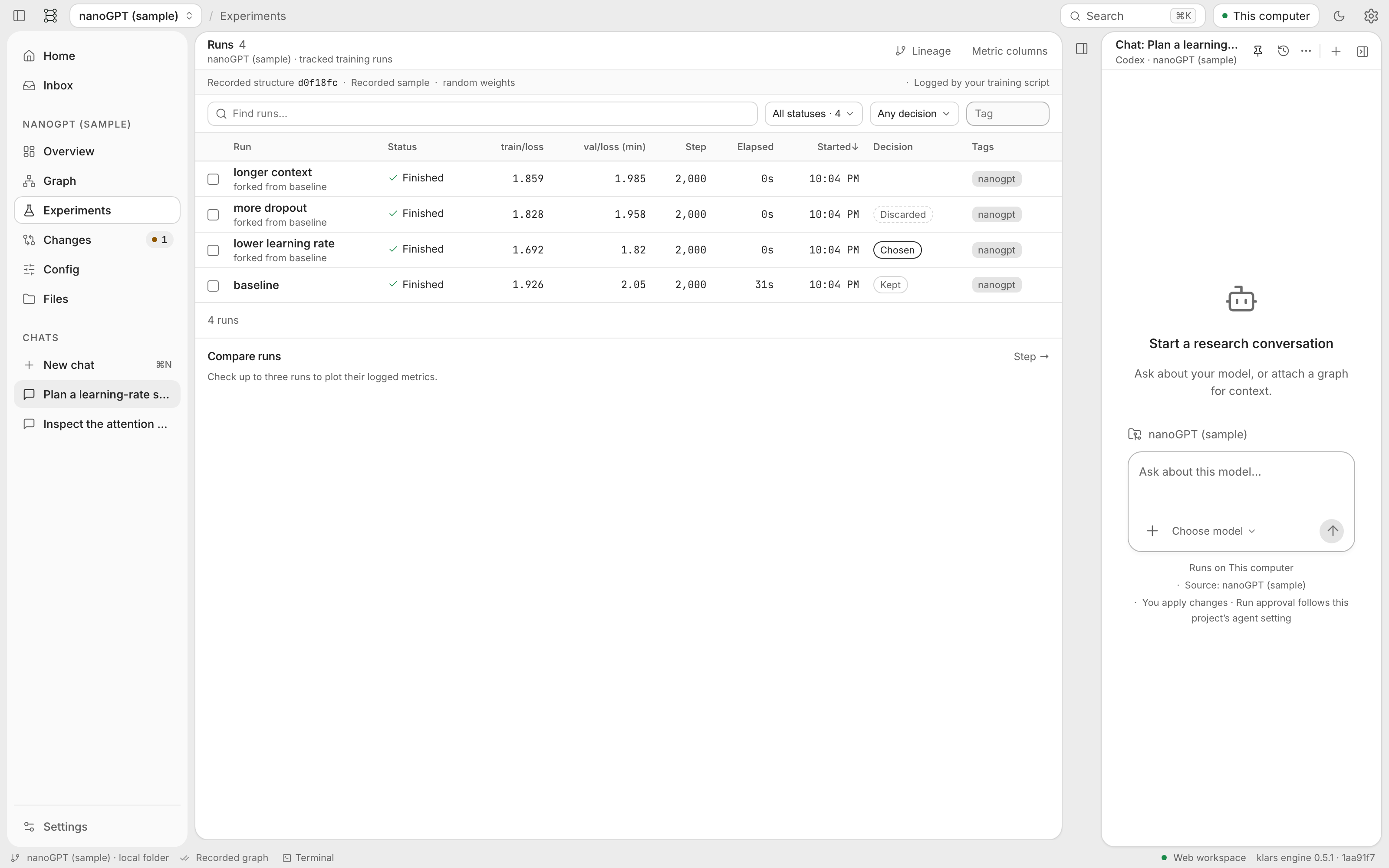
With klars_track.py importable and klars running, add the tracker to your existing training loop. The highlighted lines are the reporting calls:
python
import klars_track

run = klars_track.init(name="baseline", config={"lr": 0.01})

for step in range(steps):
    loss = train_step()
    run.log({"loss": float(loss)}, step=step)

run.finish()
steps and train_step() belong to your training script. Open Experiments in klars to see the run and its metrics.
Without an explicit project ID, the tracker uses the nearest directory with .klars/, then the Git root. If neither exists, it warns that tracking is unavailable; there is no current-directory fallback. It records the Git revision, dirty state, and command-line arguments with the run. Keep credentials out of command-line arguments.
Inspect the reported metrics
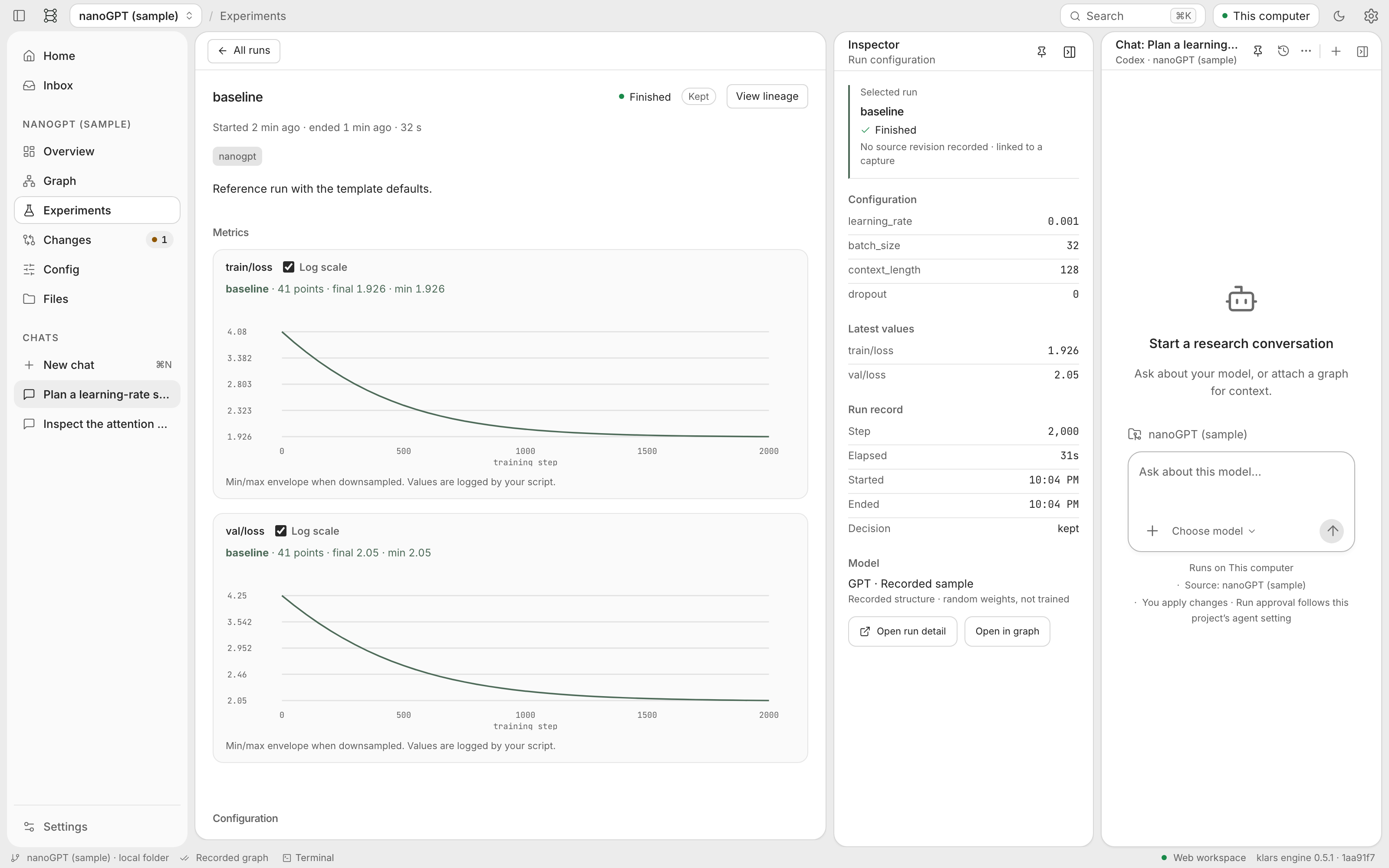
Open Experiments in the sidebar, then choose a run name such as baseline.
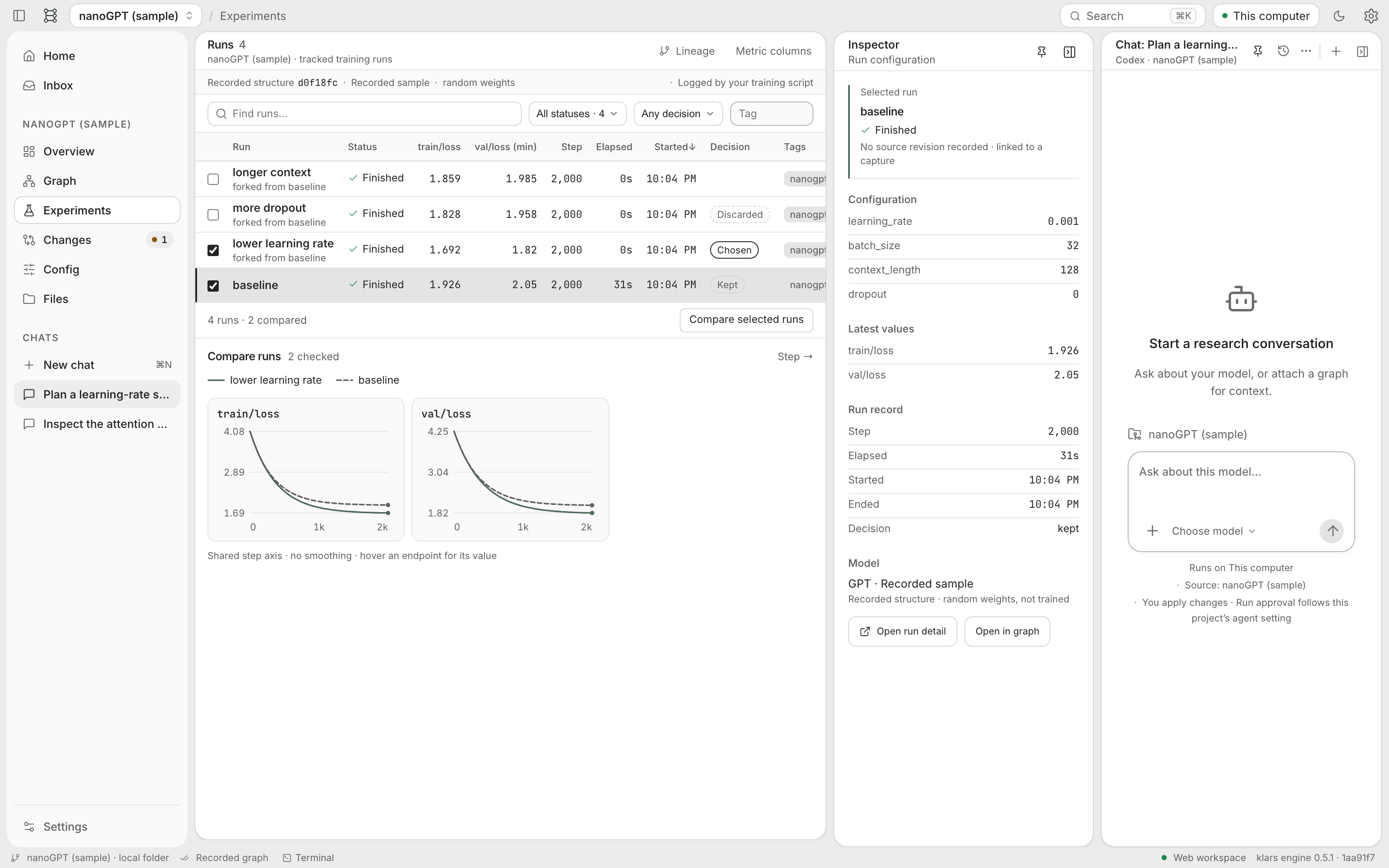
1 baseline Back in All runs, use Metric columns to choose which reported values appear in the table.
1 Metric columns
Record configuration and checkpoints
A context manager finishes the run on exit and marks an exception as a failure:
python
with klars_track.init(
    name="lower learning rate",
    config={"lr": 0.001},
    tags=["ablation"],
) as run:
    for step in range(steps):
        loss = train_step()
        run.log({"loss": float(loss)}, step=step)
    run.checkpoint("weights.pt", step=steps)
Checkpoint and artifact calls record references; they are not automatic cloud uploads. Pass parentRunId, sourceCheckpointId, or captureId to init() when you know the relationship you want Lineage to record.
Know what was delivered
By default, reporting queues data in memory on a background thread. Requests retry if the service is unavailable; the oldest entries can be dropped when the queue fills.
finish() waits up to ten seconds by default for the reporting queue to drain. Check its return value together with run.errors and run.dropped: a true return does not rule out earlier failed or dropped reports. Unsaved queue data is lost when the process exits. Use strict=True when you need synchronous responses or reporting errors to raise. With forked data-loader processes, report from the training parent.
Report from a container or another machine
Use a loopback service, reached over SSH forwarding if necessary, to create a tracking token. Token creation does not complete in direct HTTPS remote serve mode.

- Open the target project, then open Settings › Experiments › Tracking tokens and choose Create token.
- Copy the token and environment block immediately. The token is shown once and expires after 24 hours by default; the service can configure a different lifetime.
- Make the service address reachable from the training environment, for example through SSH forwarding. A loopback URL on another computer refers to that computer, so adjust the tunnel and port accordingly. In a workspace opened over SSH, the address shown is already the engine's own on that host, so a training script there uses it as is.
- Set
KLARS_URLandKLARS_TOKENin the training process. Use the project-specific Python snippet shown by Settings.
A tracking token can record runs, metrics, artifact references, and results. It cannot read the workspace or run commands. It covers the service rather than a single project. Revoke it in the same settings section when finished.
Next, read your runs in Lineage.